Across many companies, an unexpected number of documents exist only as a single flat image. Work guidelines, internal notices, org charts, training materials—the original design files have vanished, leaving only JPGs floating around team chats and message boards.
To human eyes, they look fine. The problem arises when you actually try to do something with them. Quoting a single line requires retyping it by hand, searching for "overtime guidelines" returns zero results, and if you want to ask AI about them, there’s no text to paste.
Take GNA's internal code of conduct as an example. All figures below are directly measured from this single case.
Subject: Internal Work Guidelines Notice
- "Office Etiquette — GNA Work Guidelines"
- Reference canvas
853 × 3,612 px, 1 image file600 KB - All 34 guidelines across 8 categories were locked inside pixels.
What You Couldn't Do with the Image
| Task | Image Document |
|---|---|
| Copy a line of guidelines into an announcement | Impossible — Must retype by hand |
| Search for items containing "dress code" | Impossible — Unsearchable via Ctrl+F |
| Zoom in to read small text | Blurs — Degrades the more you zoom |
| Listen with a screen reader | Impossible — No text to read |
| Ask AI: "Summarize meeting guidelines" | Impossible — No text to feed it |
After Converting to HTML
| Item | Result |
|---|---|
| Guidelines | Restored 8 lists · 34 items as real <li> tags |
| Category sections | 9 h2 headings — Work Attitude · Greetings & Cooperation · Cleanliness & Organization · Meetings & Reporting · Dress Code & Hygiene · External Communications · Company Property & Information Security · Miscellaneous |
| Body text | 64 blocks · 1,305 characters |
| Images | Separated into 9 assets, all assigned alt text (9/9) |
| Document metadata | Restored <title>, <meta description>, and lang="ko" |
What Changes for Humans
- Drag and copy directly. No need to retype when sharing a guideline in an announcement or email.
- Searchable with Ctrl+F. Jump straight to specific sections with terms like "dress code," "reporting," or "security."
- Never pixelates when zoomed. Unlike magnifying an image, text stays crisp no matter how much you enlarge it.
- Readable on mobile. Text wraps to fit screen width without horizontal scrolling or pinching.
- Accessible via screen readers. All 9 images include alt tags that describe their content clearly.
What Changes for AI
This is the key. AI doesn't look at screens; it reads structure. If you pass an image as a whole, the model has to guess the text, but this document is now structured like this:
h1  GNA Office Etiquette
h2  Work attitude                          → 7 li
h2  Greetings & cooperation                → 4 li
h2  Cleanliness & tidiness                 → 7 li
h2  Meetings & reporting                   → 4 li
h2  Dress code & hygiene                   → 3 li
h2  External relations                     → 3 li
h2  Company property & information security → 3 li
h2  Miscellaneous                          → 3 li
Which rule belongs to which category is marked up as tags. That means when you prompt the model to "Extract only meeting-related guidelines" or "Rephrase the dress code policy for an onboarding guide," it can answer with grounded precision. When integrating internal documents into chatbots or search tools, you can feed this HTML instead of raw images.
Original ↔ Output
Even after all these changes, the visual appearance remains identical. The left pane shows the original image, and the right pane shows the reconstructed HTML. Both panels scroll in sync at the exact same rate.
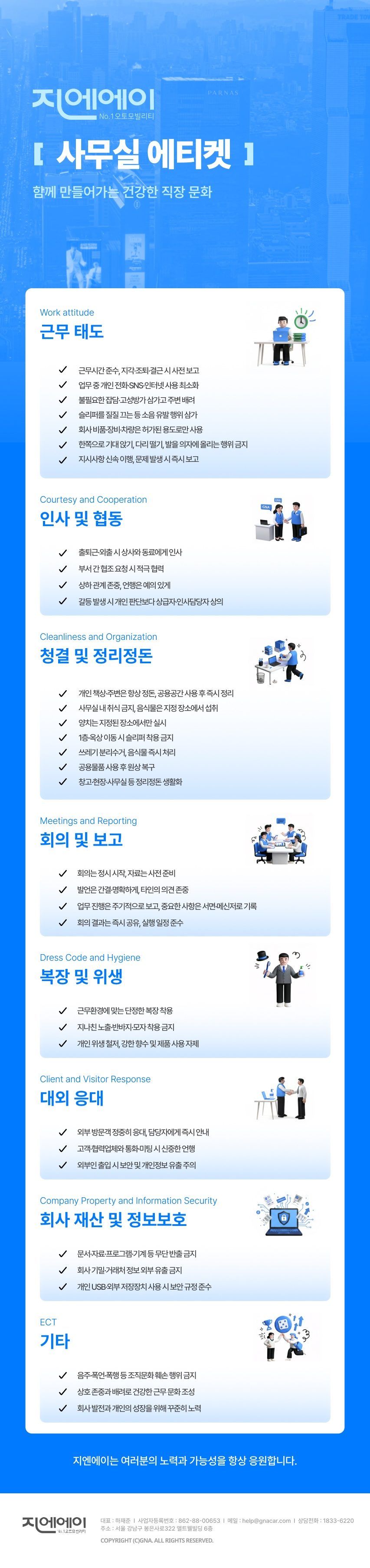
Loading…Both captures are 853×3,612 px — Same visuals, selectable text.
Quality Report
| Metric | Value | Meaning |
|---|---|---|
| height | ×1.000 | Total height exactly matches the original |
| rows | 0.997 | Correlation of horizontal row-level luminance distribution |
| struct | 1.54 | Structural error (lower is closer to the original) |
| bands | 5/5 | All 5 vertical segments fall within tolerance |
| pxdiff | PASS | Pixel comparison gate passed |
Lighter File Size
| Item | File Size |
|---|---|
| 1 original image | 600 KB |
| Output HTML document | 35 KB |
| 9 separated images | 98 KB |
| Reconstructed Total | 133 KB (approx. 78% reduction) |
A 600 KB image passed around in chats turns into a single 133 KB link. When policies change, there’s no need to redesign and redistribute an image—simply update the sentence on the page.
When Guidelines Change — This Is the Real Difference
Internal documents exist on the premise that they will change. Rules get added, wording gets polished, and responsible departments shift. With image documents, you have to repeat the following every single time:
| When Updating a Single Line | Image Document | Reconstructed HTML |
|---|---|---|
| Original design file | Hunt down the creator and file (start from scratch if they left) | Not needed |
| Person in charge | Designer | HR / General Affairs staff directly |
| Workflow | Edit → Re-export → Replace file | Edit only that single <li> line |
| Redistribution | Re-upload new images across chat channels and boards | Unnecessary — The same URL is always up to date |
| Version confusion | Outdated images saved locally keep circulating | Zero outdated versions because there is only one link |
In this document, all 34 rules are structured as individual <li> tags, and all 8 categories as individual <h2> tags. Adding a rule to "Cleanliness & Organization" is as simple as inserting one line into that <ul>, leaving the remaining 33 items and the layout untouched.
The biggest change is that redistribution becomes obsolete. With an image document, you have to blast out a new file every time an edit is made, and locally saved legacy versions still float around. An HTML document uses a single URL, so the moment you make an edit, everyone sees the latest version. Even internal chatbots and search tools referencing the source automatically stay up to date.
Summary
- Internal image documents are visible to humans, but cannot be copied, searched, read aloud, or ingested by AI.
- Rebuilding them in HTML while preserving the design allows humans to copy and search, and AI to understand their structure.
- In this case study, 34 rules and 8 categories were revived as clean tags, producing visuals so identical they passed pixel comparison tests.
- Maintenance sees the biggest leap. When rules change, you only edit a single line of text—no re-exporting images, no redistribution. With a single URL, everyone always sees the latest version.
View Original ↔ Output Side by Side ↗
Open Reconstructed HTML Document Only ↗ — Open it to select and copy text yourself.